
6 Degrees Hosting | One-Stop Hosting Marketplace
  • Contact Sales
  • Cart (0)
  • Manage My Account
6 Degrees Hosting Logo
  • Register Domains
    Register Domains
    Transfer Domains
  • Web Hosting
    Shared Web Hosting
    Reliable shared cPanel Linux or Windows hosting NVMe powered fast servers ideal for business websites, hosting sites and growing online projects.
    • NVMe SSD Powered Storage
    • cPanel or Plesk Control Panel
    • Free SSL certificate
    • Free Email Accounts
    • Add On Domains
    Learn More
    Hosting & Servers
    VPS Servers Virtual Private Servers Dedicated Servers The most powerful hosting- your very own server Xcitium Backup Automated website cloud backup
    Extras & Services
    cWatch Security Website Security & Malware Removal
  • Extras
    Website Security
    Comodo cWatch is an all-in-one website security solution designed to protect, monitor, and optimize your online presence. With the ever-evolving landscape of cyber threats, having a reliable and robust security system is more important than ever. cWatch is here to provide you with the peace of mind and confidence that your website is safe and secure from threats, all while enhancing performance and user experience.
    • Malware Detection & Protection
    • Daily Automatic Security Scanning
    • Daily Automatic Malware Removal
    • File Change Monitoring
    • Trust Seal Available
    Learn More
    Security & Protection
    SSL Certificates Encrypt your website using https Email Spam Experts Secure your incoming and outgoing email
    More Tools & Services
    NordVPN Protect your online privacy SEO Tools SEO report with optimization steps
  • Support
    Submit Ticket
    Knowledgebase
Order
Menu
Home
Register Domains
Register Domains Transfer Domains
Web Hosting
Shared Web Hosting
Hosting & Servers
VPS Servers Dedicated Servers Xcitium Backup
Extras & Services
cWatch Security
Extras
Website Security
Security & Protection
SSL Certificates Email Spam Experts
More Tools & Services
NordVPN SEO Tools
Support
Submit Ticket Knowledgebase
Order

Knowledgebase

Portal Home > Knowledgebase > SiteWorx (Control Panel) > SiteWorx Basic > How to Edit File in the SiteWorx File Manager

  Categories

An Extended Knowledagebase Option
1
Backup/Restore
5
CloudLinux (cPanel)
10
cPanel - Control Panel
24
Databases
11
DirectAdmin
48
DNS - Nameservers
6
Domain Management
10
Email
18
FTP
9
Installing a Control Panel
6
Mail Filters & SPAM
8
Mobile
11
Others
3
OX APP Suite
1
PayPal
7
Plesk
47
Security
10
Server Status
0
SiteWorx (Control Panel)
58
Softaculous
69
SolusVM
18
SSL
5
Virtualizor
19
WHM
18
WordPress
17

  Categories

  Tag Cloud

Extended Knowledgebase Manage Email Accounts

  Support

My Support Tickets
Announcements
Knowledgebase
Downloads
Network Status
Open Ticket

How to Edit File in the SiteWorx File Manager Print

  • 4

You can use SiteWorx's inbuilt file manager to edit files on your website.


1.
Log in to your SiteWorx account.

2. In the File Manager section, click on File Manager.

sw-file-manager-icon.gif


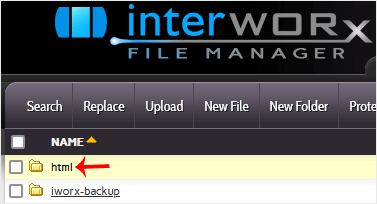
3. Navigate to the directory where your file is located.
siteworx-filemanager-html.gif

4. Click on the file you want to edit, and it will open in edit mode.
siteworx-filemanager-file-edit.gif

5. Make changes to your file and then click on Save.
siteworx-filemanager-edit.gif

Your file has been successfully edited.


Was this answer helpful?

Related Articles

How to Create a Directory or Files in the SiteWorx File Manager SiteWorx File Manager is handy for managing your website files. 1. Log in to your SiteWorx... How to Upload Files via the SiteWorx File Manager You can use SiteWorx's inbuilt file manager instead of an FTP program. 1. Log in to your... How to Access AWStats in SiteWorx AWStats is an open-source web analytics tool. Follow the steps below to access your AWStats. 1.... How to Access Webalizer in SiteWorx Webalizer is an open-source web analytics tool. Follow the steps below to access Webalizer. 1.... How to Update Your SiteWorx Email Address You can change your SiteWorx email address by following the steps below. 1. Log in to your...
« Back

Powered by WHMCompleteSolution

  Tag Cloud

Extended Knowledgebase Manage Email Accounts

  Support

My Support Tickets
Announcements
Knowledgebase
Downloads
Network Status
Open Ticket
6 Degrees Hosting Partners
6 Degrees Hosting
Join Today!
Services
  • Shared Hosting
  • VPS Servers
  • Dedicated Servers
  • Xcitium Backup
  • cWatch Security
Extras
  • SSL Certificates
  • Email Spam Experts
  • SEO Tools
  • Business Email
  • NordVPN
Domains
  • Register Domains
  • Transfer Domains
Support
  • Submit Ticket
  • Knowledgebase
About 6 Degrees Hosting
Founded in 2005, 6 Degrees Hosting is a one-stop marketplace for Shared Hosting, Cloud, Dedicated Server, VPS, Domains & other tools for Web Design & Development Pros. more
sales@6degreeshosting.com
Follow 6 Degrees Hosting
 Facebook
 X
6 Degrees Hosting © 2026 | All rights reserved
  • Terms Of Service
  • Acceptable Usage Policy
  • Privacy Policy
PayPal logo
Credit Card logo
cWatch

Loading...
Loading...

Generate Password

Enter a number between 12 and 64 for the password length.